Chrome extension · Local export
Export Booking.com reviews to structured CSV
Turn hotel, attraction, and cruise reviews into clean spreadsheet rows—built for hospitality teams, market analysts, and researchers who need repeatable data without copy-paste.
Three export modes with dedicated field sets. Processed locally in Chrome—your reviews are not uploaded to NioMaker during export.
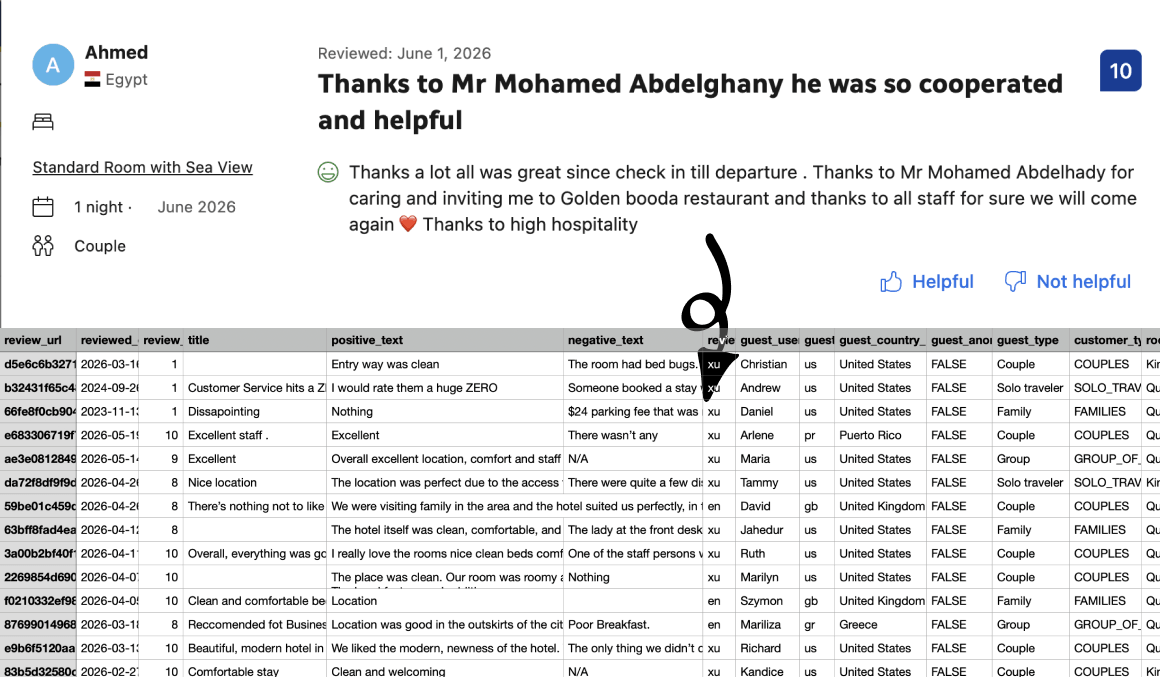
Everything you need for Booking.com review exports
One extension for hotels, attractions, and cruises—structured the way hospitality and travel analysts actually work.
Hotels, attractions, and cruises
Export reviews from Booking.com property pages, attraction listings, and cruise review sections—one extension, three export modes.
Fields matched to each listing type
Hotel exports include up to 22 columns—stay dates, room type, guest profile, and split positive/negative text. Attraction and cruise modes ship their own schemas.
Guest and stay context for hotels
Capture guest type, country, room details, check-in/out, nights stayed, partner replies, and review photos in one row.
CSV-ready for sheets and BI
Stable column names for Excel, Google Sheets, BI tools, and CRM imports—no manual cleanup after export.
Page order preserved
Export rows aligned with the order reviews appear on the page—useful for audits, sampling, and side-by-side comparison.
Runs in your browser
Reviews are processed locally in Chrome; your export is not uploaded to NioMaker during the scrape.
Three export modes, structured fields
Each listing type exports its own column set—one row per review, ready for analysis and reporting.
Hotels
Property reviews with stay metadata—room type, check-in/out dates, guest type, positive and negative text, partner replies, and photo URLs.
22 fields
- review_url
- reviewed_date
- review_score
- title
- positive_text
- negative_text
- review_lang
- guest_username
- guest_country_code
- guest_country_name
- guest_anonymous
- guest_type
- customer_type
- room_type
- room_id
- checkin_date
- checkout_date
- num_nights
- stay_status
- helpful_votes
- partner_reply
- photo_urls
Questions about field coverage? Check the FAQ or email help@niomaker.com.
How Booking Review Extractor works
Three steps from the Booking.com page to structured CSV.
Open a Booking.com reviews page
Go to a hotel property’s reviews, an attraction’s reviews, or a cruise listing’s review section on Booking.com.
Export from the extension
Click the extension icon, choose Hotels, Attractions, or Cruises, then start the export for the current page.
Download your CSV
When the export finishes, download the CSV from the extension’s export dashboard.
Simple pricing for Booking.com review exports
Start free on real Booking.com pages. Upgrade when you need unlimited reviews per export.
Free
Try exports on hotel, attraction, and cruise review pages before you scale.
- Up to 20 reviews per export
- Hotels, attractions, and cruises—all field sets included
- Up to 22 structured fields for hotel exports
- Extension updates while on the free tier
Pro
For teams that export Booking.com reviews regularly for reporting, monitoring, and analysis.
Pro removes the per-export review cap so you can pull full review sets in one go.
- Unlimited reviews per export
- Everything in Free, with no per-export limit
- All export modes: hotels, attractions, and cruises
- Priority support from the NioMaker team
- Updates included while subscribed
Ready to export your next review set?
Install Booking Review Extractor and move hotel, attraction, and cruise review data into your stack without the copy-paste tax.
Get Booking Review ExtractorFrequently asked questions
Which Booking.com pages are supported?
The extension supports three export modes: hotel property reviews, attraction reviews, and cruise reviews. Open the relevant reviews section on Booking.com, then export from the extension.
Do export fields differ by type?
Yes. Hotels, attractions, and cruises each have a dedicated field set—for example, hotels include stay dates and room type, while cruises include ship name and sail date. See the Data section above for the full column lists.
What file format do exports use?
Exports download as CSV with consistent column headers, ready to open in Excel, Google Sheets, or import into analytics and CRM tools.
How do I switch between hotel, attraction, and cruise mode?
Select the export mode in the extension before you start an export. Pick the mode that matches the Booking.com page you have open.
Is Booking Review Extractor affiliated with Booking.com?
No. Booking Review Extractor is built by NioMaker and is not endorsed by or affiliated with Booking.com. Trademarks belong to their respective owners.
What should I know about terms of use?
You are responsible for complying with Booking.com’s terms of service, applicable laws, and any agreements that govern your access to review data. Use the extension only for scenarios you are authorized to export.
Do you store the reviews I export?
This website does not run the export for you—the extension operates in your browser. See our Privacy Policy for how NioMaker handles account or support-related data.